Search Snippet Tool: Optimise Your Google Search Preview for Better Click-Through Rates
When people search on Google, they make decisions within seconds. Before they visit your website, they first see your page title, website URL, and meta description. These three elements create your search snippet and influence whether someone clicks your page or chooses another result. A well-written search snippet can significantly improve your click-through rate, while a poorly written one can reduce valuable organic traffic.
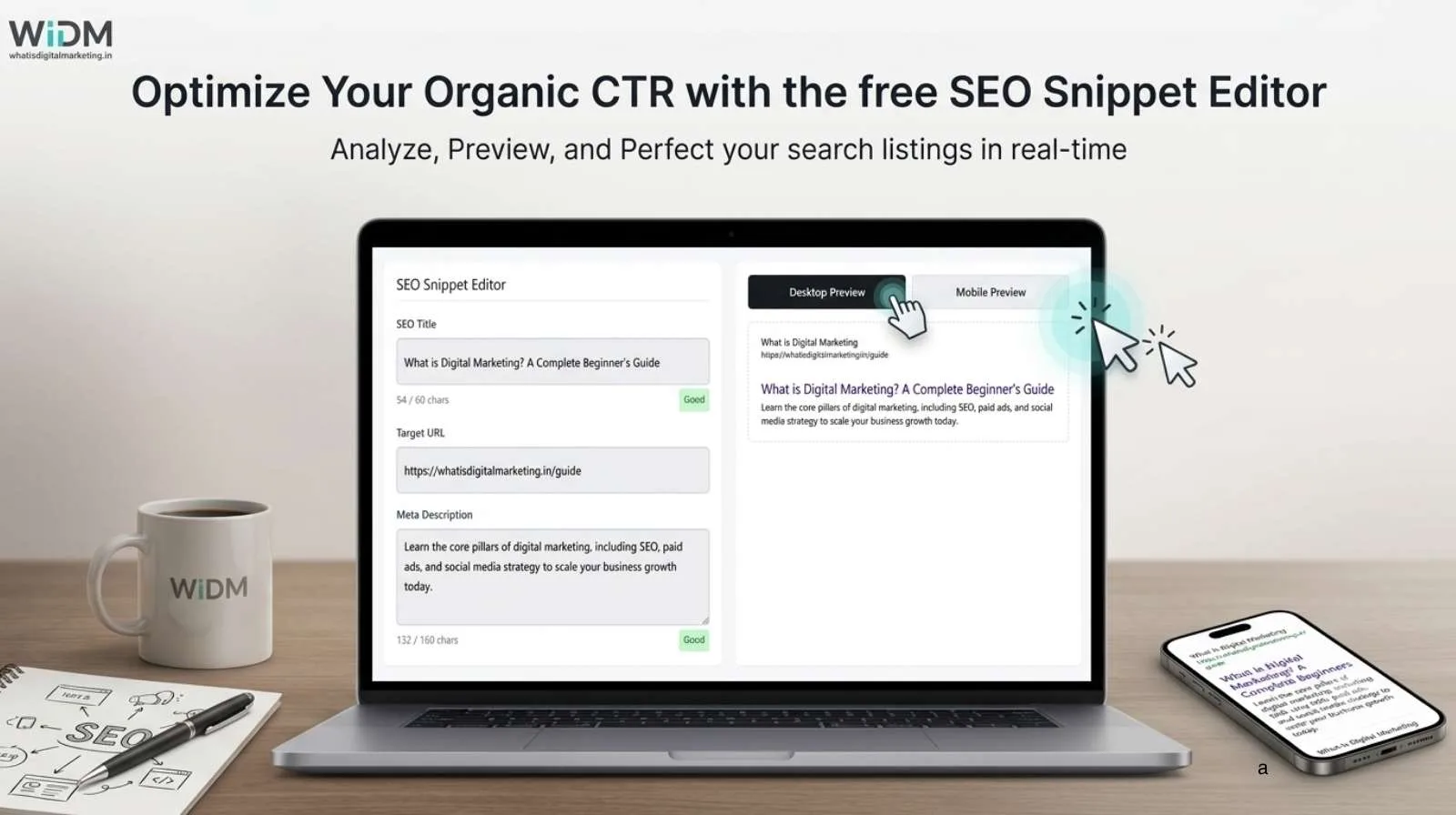
The Search Snippet Tool available on What Is Digital Marketing helps you preview exactly how your webpage may appear in Google Search before publishing. By using the Search Snippet Tool, you can optimise your SEO title, URL, and meta description to create an attractive search result that encourages more users to click your website. Instead of guessing whether your title or description will fit within Google’s display limits, you can view a live simulation on both desktop and mobile devices. The tool also provides character counters and status indicators, making it easier to create metadata that looks professional and remains within recommended limits. Whether you are an SEO beginner, content writer, blogger, business owner, or digital marketing professional, this free tool simplifies metadata optimisation and helps improve your search appearance.
What Is a Search Snippet?
A search snippet is the preview that appears beneath your webpage in Google search results. It normally consists of three important elements: the SEO title, the page URL, and the meta description. These elements provide users with a quick summary of your webpage before they decide to click.
Although users spend only a few seconds looking at search results, those few seconds often determine whether your website receives a visitor. Even if your content ranks on the first page, a poorly written snippet can reduce clicks because users may not understand what your page offers. An attractive title and a compelling description help your website stand out among competing search results.
Why Search Snippets Matter for SEO
Search snippets play an important role in improving user engagement. While Google does not use meta descriptions as a direct ranking factor, they strongly influence click-through rates. A clear and informative title encourages users to choose your website, while a persuasive description explains the value they will receive after clicking.
Many website owners spend hours creating quality content but pay very little attention to their metadata. As a result, Google may truncate important information or even rewrite the title if it considers the original version unsuitable. Using a search snippet preview tool helps you avoid these problems before your content is published.
Features of the Search Snippet Tool
The Search Snippet Tool has been designed to make metadata optimisation simple and efficient. Users can enter their SEO title, target URL, and meta description into dedicated input fields while watching the preview update instantly.
The Search Snippet Tool includes live character counters that display the current length of both the title and description while providing instant feedback to help you keep your metadata within recommended limits. Colour-coded status badges indicate whether the text remains within recommended limits or is likely to be truncated. Users can also switch between desktop and mobile preview modes to compare how their metadata appears across different devices. These interactive features allow quick adjustments without repeatedly editing the page after publication.
How to Use the Search Snippet Tool
Using the Search Snippet Tool requires only a few simple steps. The Search Snippet Tool provides a live preview as you enter your SEO title, URL, and meta description, allowing you to make improvements before publishing your webpage. Begin by entering your SEO title into the title field. Next, type or paste your webpage URL into the URL section. Finally, write your meta description in the description box.
As you type, the preview updates automatically. The character counters also change in real time, allowing you to monitor the length of your metadata. If the title or description becomes too long, the status badge changes to indicate that your content may be truncated in search results. You can then shorten the wording until it fits comfortably within the recommended display limits.
Once you are satisfied with the preview, copy the title and description into your preferred content management system or SEO plugin before publishing your webpage.
Why Character Count Is Not Always Enough
Many SEO guides recommend keeping titles below sixty characters and descriptions below one hundred and sixty characters. While these recommendations provide a useful starting point, Google actually measures search snippets using visual pixel width instead of simple character counts.
Some letters occupy more horizontal space than others. For example, capital letters such as W and M are much wider than lowercase letters such as i or l. Because of this difference, two titles containing the same number of characters may display differently in Google Search. One title may fit perfectly while another becomes truncated.
The Search Snippet Tool helps overcome this challenge by providing a visual preview that closely resembles how metadata appears in search results. Instead of relying entirely on character counts, users can judge how their content looks before publishing.
Desktop and Mobile Search Preview
Modern users search from a wide variety of devices. Desktop computers offer more horizontal space, allowing longer titles and descriptions to remain visible. Mobile phones have smaller screens, meaning Google often truncates text sooner.
The Search Snippet Tool includes separate desktop and mobile preview modes so users can compare both layouts instantly. This feature helps ensure that important keywords, product names, and calls to action remain visible regardless of the device used by the searcher. Keeping essential information near the beginning of the title and description improves visibility across both platforms.
Best Practices for Writing Better Search Snippets
Creating effective metadata requires more than simply staying within a character limit. Your SEO title should clearly describe the page while naturally including your primary keyword near the beginning. Avoid unnecessary repetition and make the title easy to understand.
Your meta description should explain the value of the page rather than simply repeating the title. Use action-oriented language that encourages users to click. Words such as discover, learn, compare, improve, and explore can help make descriptions more engaging. Every page on your website should also have unique metadata to avoid duplicate search snippets.
Who Should Use This Tool?
The Search Snippet Tool is suitable for anyone responsible for creating or publishing website content. Bloggers can optimise articles before publishing. Businesses can improve the appearance of product and service pages. SEO professionals can test multiple title variations during optimisation projects. Digital marketing agencies can prepare search previews for clients before launching campaigns.
The Search Snippet Tool is equally valuable for WordPress users who rely on SEO plugins because it provides an additional visual check before metadata goes live, helping ensure your search snippet looks professional across both desktop and mobile search results. Instead of waiting for Google to crawl the page, users can confidently publish content knowing that the search snippet has already been reviewed.
Conclusion
An effective search snippet can make the difference between receiving a click and losing a visitor to a competing website. While creating valuable content remains essential, presenting that content attractively in Google Search is equally important. The Search Snippet Tool from What Is Digital Marketing provides an easy way to preview titles, URLs, and meta descriptions before publication, helping users avoid truncation and improve their search appearance.
With live desktop and mobile previews, real-time character counters, status indicators, and an intuitive interface, the tool simplifies one of the most important aspects of on-page SEO. Whether you manage a personal blog, a business website, or multiple client projects, using this free Search Snippet Tool can help you create better metadata, improve click-through rates, and make a stronger first impression in Google Search. To experience its features, visit Search Snippet Tool and optimise your next search snippet before you publish.
Frequently Asked Questions
What is a search snippet?
A search snippet is the preview shown in Google search results. It includes the page title, website URL, and meta description.
Does this tool improve rankings?
The tool does not directly improve rankings. It helps optimise metadata, which can encourage more users to click your result.
Why is my title still truncated?
Google measures visual pixel width rather than simply counting characters. Wide letters occupy more space than narrow letters.
Can I preview mobile search results?
Yes. The tool includes separate desktop and mobile preview modes so you can compare both layouts before publishing.
Is the Search Snippet Tool free?
Yes. The tool is available free of charge and can be used as often as needed.